Create and edit a QR code without a subscription, middleman or tracking
You run a shop, a practice, a restaurant, an independent business. You want people to reach your page, your menu, your booking calendar or your profile with a single scan, from a poster, a business card or a shop window. That is what the QR code is for. But not all QR codes are equal, and the difference, invisible to the eye, can cost you dearly: some watch your customers, others stop working the day you stop paying. Here is how to see clearly, without being technical, and how to keep a QR code that truly belongs to you.
"Static" or "dynamic": the real difference
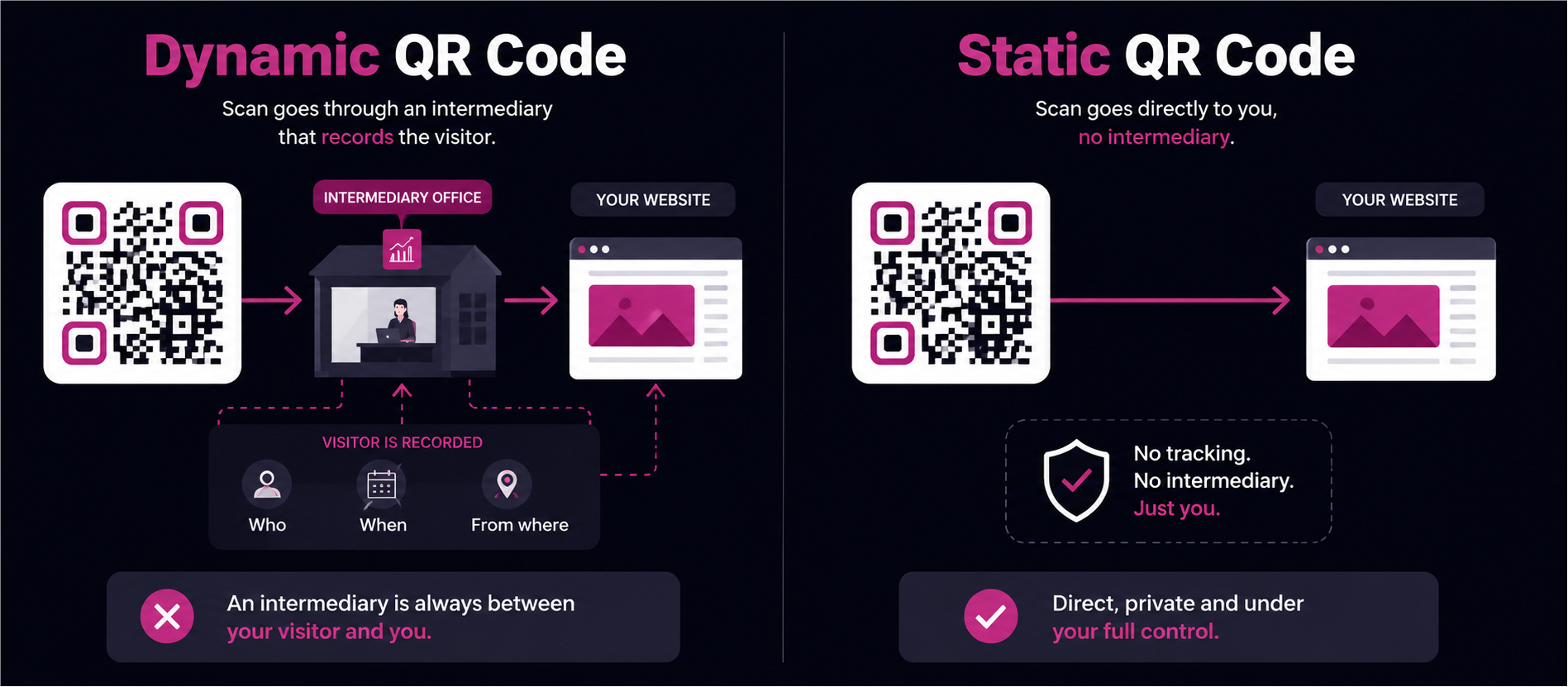
There are two kinds of QR codes. Here is an image to tell them apart.
Picture giving your address to a customer. Option one: you write it straight onto a piece of paper. The customer comes to you, nobody else knows. Option two: you give them the address of a middleman desk. Every time someone shows up, that desk notes who came, when and from where, then points them to your real address.
These two options have names. The paper with your address on it is the static QR code: the address is written into the code, you scan, you arrive, done. The middleman desk is the dynamic QR code: the code sends first to a server that records the visit, then redirects to your real page1.
The dynamic type is sold as an advantage, because you can change the destination later. But you can see the flip side: there is now someone, permanently, standing between your customer and you.
What a QR code can record about your customers
So what does this middleman desk record? On every scan, it can keep the time, the rough location and the type of phone used2. On your side, you get a dashboard of statistics. On your customer's side, nothing shows: they think they are simply opening a link.
It is not illegal. But the moment you gather this information, European law (the GDPR) treats you as responsible: you have to inform people and keep only what is strictly necessary3. In practice, many people drop in a dynamic QR "to get some numbers" and never think about it again. The data is collected first; whether it was allowed comes later, or never.
The QR that switches off when you stop paying
Watching is not the only trap. There is dependence. Because your real address lives at that middleman desk, your QR code only works as long as the desk agrees to redirect. And many "free" generators are really trials. Once the trial or the subscription ends, the dynamic QR is switched off: instead of opening your page, it shows a message from the provider4.
The risk is real, and common. According to Uniqode's State of QR Codes 2026 report, 29% of consumers have already run into an expired or dead QR code link, and a dynamic QR stops working precisely when the account's subscription ends5. The square carries your name, not the provider's: you are the one the customer will hold responsible.
The damage is very real. A restaurant prints a thousand menus, switches provider six months later: every menu now points to nothing. One brand even saw its old QR codes redirect to unsuitable content once the expired addresses were picked up by others6. The printed square had not changed: it was the desk behind it that closed.
What about Canva or Adobe?
Design tools also offer a QR code generator, but it all depends on the tool, and Canva changed the picture recently.
Adobe Express8, like Canva's basic QR7, creates a direct-address QR: it does not watch your customers. In exchange, though, the link can no longer be changed once the code is created, and there are no statistics. This lack of tracking comes from the type of code, not from a privacy choice: your files and your account still sit on US servers.
Canva now also offers a second, dynamic QR on its paid plans7. That one goes through a middleman: you can change the link, but you also collect scan statistics, device type and location included. In other words, the moment you want an editable QR from Canva, you are back at the middleman desk that watches.
In every case, this QR stays a sticker placed next to your visual, not a living part of your design. So the market lets you choose: a frozen QR that does not watch, or an editable QR that follows you. Never both at once.
A third way: a QR code that belongs to you
This is exactly the gap Ask N Pic fills. The idea fits in one sentence: your address is written straight into the QR code, with no middleman desk. No middleman, so nothing to watch. No third-party server, so nothing that switches off when you stop paying. The QR belongs to the file you download, full stop.
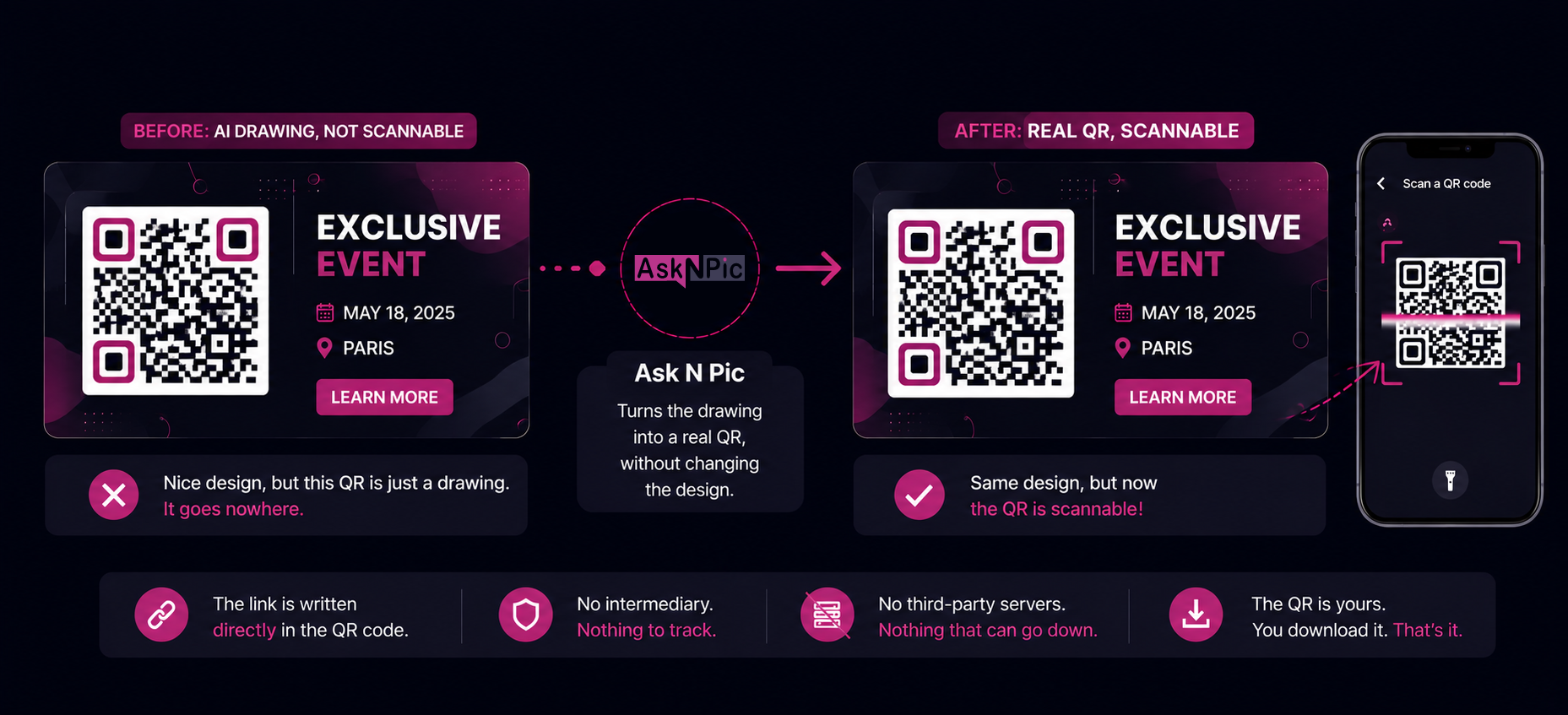
Two uses follow, and almost nobody offers them. The first: bringing a QR code drawn by an artificial intelligence to life. These images often produce a nice square that looks like a QR code but leads nowhere: it is a drawing, not a door. Ask N Pic turns it into a real QR, exactly where it sits in the visual, without breaking the design, and you can test it right away.
The second: recycling a visual whose link has changed. You switch your main social network, your booking page moves, your offer evolves? No need to start over. You reopen the visual, update the QR code's address, and re-export a file ready to share again. The design stays the same; only the text and the link change.
Comparison: three ways to make a QR code
Here are the three approaches side by side. Information about the other tools comes from their public documentation, to be checked on their site as it may change.
| Approach | Built into the design | Watches your customers | Works without a subscription | Where your data lives |
|---|---|---|---|---|
| Third-party dynamic QR (QR Tiger, Bitly, etc.) | ❌ Separate code | ❌ Yes, on every scan | ❌ Cut off when you stop | ⚠️ Often outside the EU |
| Canva basic / Adobe Express QR (static) | ❌ Sticker on the side | ✅ No | ✅ Yes | ❌ US servers (Cloud Act) |
| Canva dynamic QR (paid plan) | ❌ Sticker on the side | ❌ Yes | ❌ Paid plan | ❌ US servers (Cloud Act) |
| Ask N Pic | ✅ Living part of the visual | ✅ No | ✅ Yes | ✅ Switzerland (Infomaniak), outside Cloud Act |
⚠️ (Cloud Act) = tool subject to US law, which lets US authorities request access to data. Sources: public documentation of each tool, June 2026.
Creating and editing your QR codes is available from the first paid plan, or with a small one-off pack at €1.99 excl. VAT, with no commitment. You do not need to pay every month to keep a QR alive: because it relies on no middleman desk, it never switches off on its own.
Frequently asked questions
QR code without a subscription: what you ask
Can a QR code track the people who scan it?
It depends on the type. A direct-address QR (called "static") leads straight to your page, with no middleman: there is nothing to record. A "dynamic" QR goes first through a server that logs each scan, the time, the rough location and the type of phone, before redirecting1. So it is not the square that watches, it is the service standing between your customer and you.
Are Canva or Adobe Express QR codes trackable?
It depends. Adobe Express8 and Canva's basic QR7 create a direct-address QR with no tracking: good news for your customers, but the link then cannot be changed and there are no statistics. Canva also offers, on its paid plans, a dynamic QR that is trackable: you can change the link, but you collect scan statistics (device, location). And in every case, your files stay on US servers.
Can my QR code stop working overnight?
A direct-address QR works as long as your page exists. A "dynamic" QR depends on an active subscription: when the trial or the payment ends, many services switch it off, and it shows a message instead of your page4. The printed square has not changed, but the redirection is cut. That is the risk of the rented QR.
Can you edit a QR code that has already been created?
Yes, as long as you understand what "edit" means. With Ask N Pic, you change the address by reopening the visual and re-exporting it: a new file, with the new link. A copy that is already printed, however, keeps the link it had when printed, because the address is written straight into the code. For a printed code to change destination remotely, you would need a middleman desk, the very one that watches your customers and cuts the service if a payment is missed.
Is the Ask N Pic QR code GDPR-compliant?
Yes. It leads straight to your page, with no shortener or redirector: no scan is intercepted, no data from the person scanning is collected. So there is nothing to declare on the tracking side. And your files stay on European infrastructure (Infomaniak, in Switzerland, outside the Cloud Act), protected by a unique encryption key per user.
A QR code that truly belongs to you
Ask N Pic generates graphic compositions where the QR code is a living part of the visual: direct address, zero middleman, zero tracking. Hosted in Europe. Beta sign-ups are open, limited spots.
Join the beta