Canva alternatives for professional visuals: what has really changed in 2026
Canva remains the reference tool for creating visuals without a design background. But at $15/month for the Pro plan, with data hosted outside Europe and customization constrained by templates, more and more freelancers and small teams are looking for an alternative that fits their actual needs. Here is an up-to-date overview, without sugarcoating, of what exists in June 2026, for whom, and what each tool does not do.
Canva in 2026: what has changed, what has not
Canva remains the reference tool. In April 2026, the platform reported 265 million monthly active users and $4 billion in annual recurring revenue1. This is not a niche product: it is the tool most freelancers and marketing teams already use.
What has genuinely changed is AI. Canva AI 2.0, launched in April 20262, introduces a proprietary foundation model (the Canva Design Model) that generates fully editable, layered designs from a natural language prompt. Previously, Canva started from an existing template that you adapted. Now you can describe what you want and get a structured composition, without choosing a starting model. That is a substantial change.
What has not changed: the price, the hosting, and the ecosystem lock-in. Canva Pro is $15/month or $120/year3. SVG export remains restricted to paid plans. And according to Canva's official technical documentation4, data is hosted on Amazon Web Services (AWS) infrastructure. AWS is a US company subject to the Cloud Act, meaning that even storage in an EU region does not protect against a request for access by US authorities5. For European organisations subject to strict sovereignty obligations, this is a documented concern.
One more point to note: according to Canva's privacy policy (updated April 2026)6, OpenAI is listed as an AI sub-processor. User content may be used to improve Canva services: the opt-out is not enabled by default. Furthermore, Canva AI 2.0 is only available on Pro+ and Enterprise plans3. Not on the standard Pro plan at $15/month.
Established alternatives: Adobe Express, Figma, Piktochart
Before looking at what has emerged since 2024, here are the tools that have their place depending on the use case.
Adobe Express
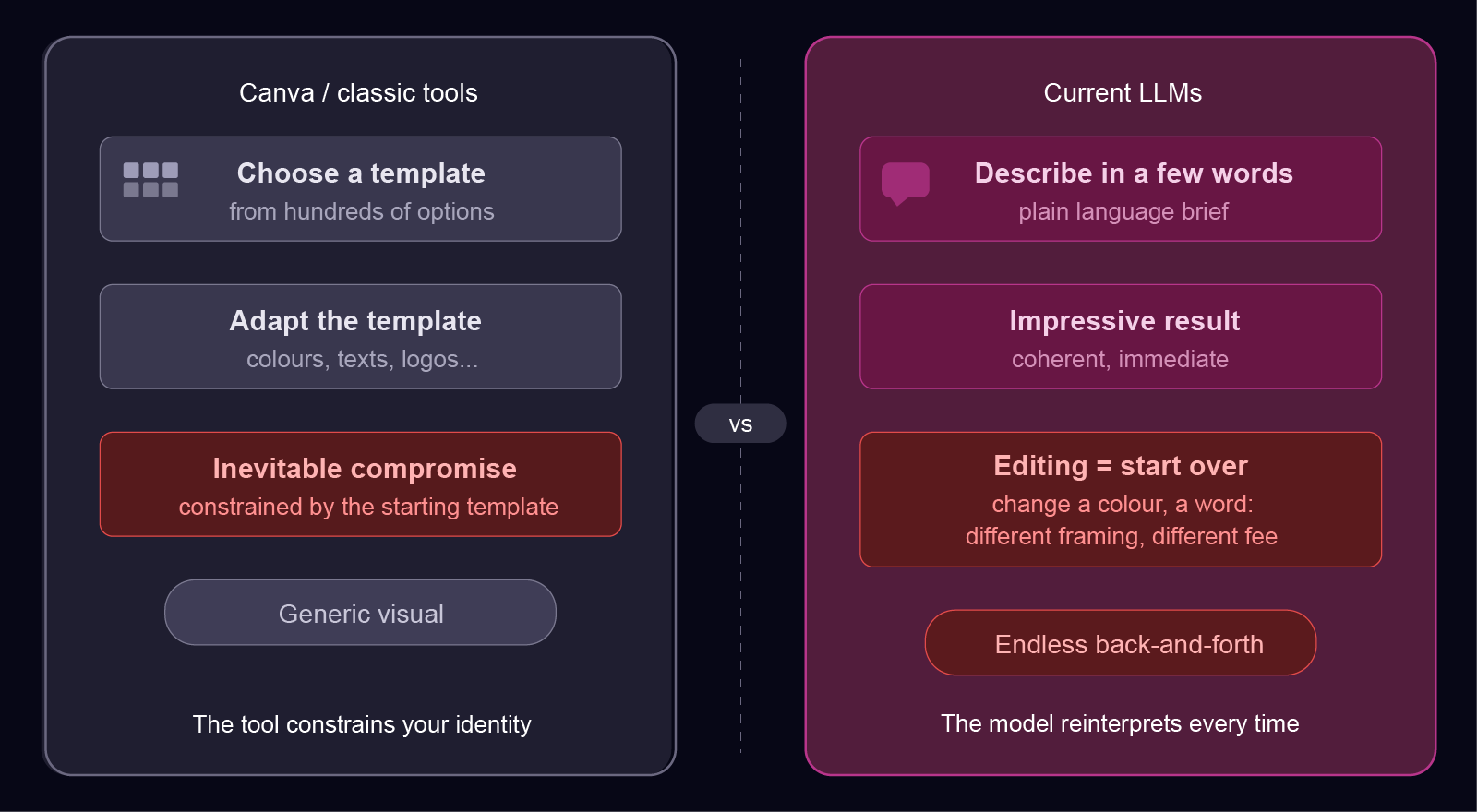
Adobe Express remains the main direct alternative to Canva for creatives who want to stay within a recognised ecosystem. The free plan gives access to thousands of templates with PNG and JPG export. The paid plan integrates with Photoshop and Illustrator via Creative Cloud. Main limitation: same logic as Canva, you choose a template and adapt it. Data is hosted by Adobe Inc., a US company, infrastructure subject to the Cloud Act.
Figma
Figma is the reference tool for professional designers. There are no imposed templates: you start from a blank page with pixel-perfect precision. It is powerful, but the learning curve is real. Figma is not a Canva alternative for someone who wants to create a business card in 10 minutes without training. It now integrates AI features (generation from a prompt, layout suggestions), but the tool remains designer-oriented. AWS hosting, US infrastructure.
Piktochart
Piktochart has specialised in structured infographics and visual reports. If your main need is to turn data into readable visualisations, it is a more suitable tool than Canva for that specific use case. It is not designed for business cards or LinkedIn carousels.
New AI entrants: Recraft, Claude Design, Gamma and others
Since 2024, a new category of tools has emerged: AI-based visual generators that let you describe what you want in natural language, rather than starting from a template.
Recraft v4
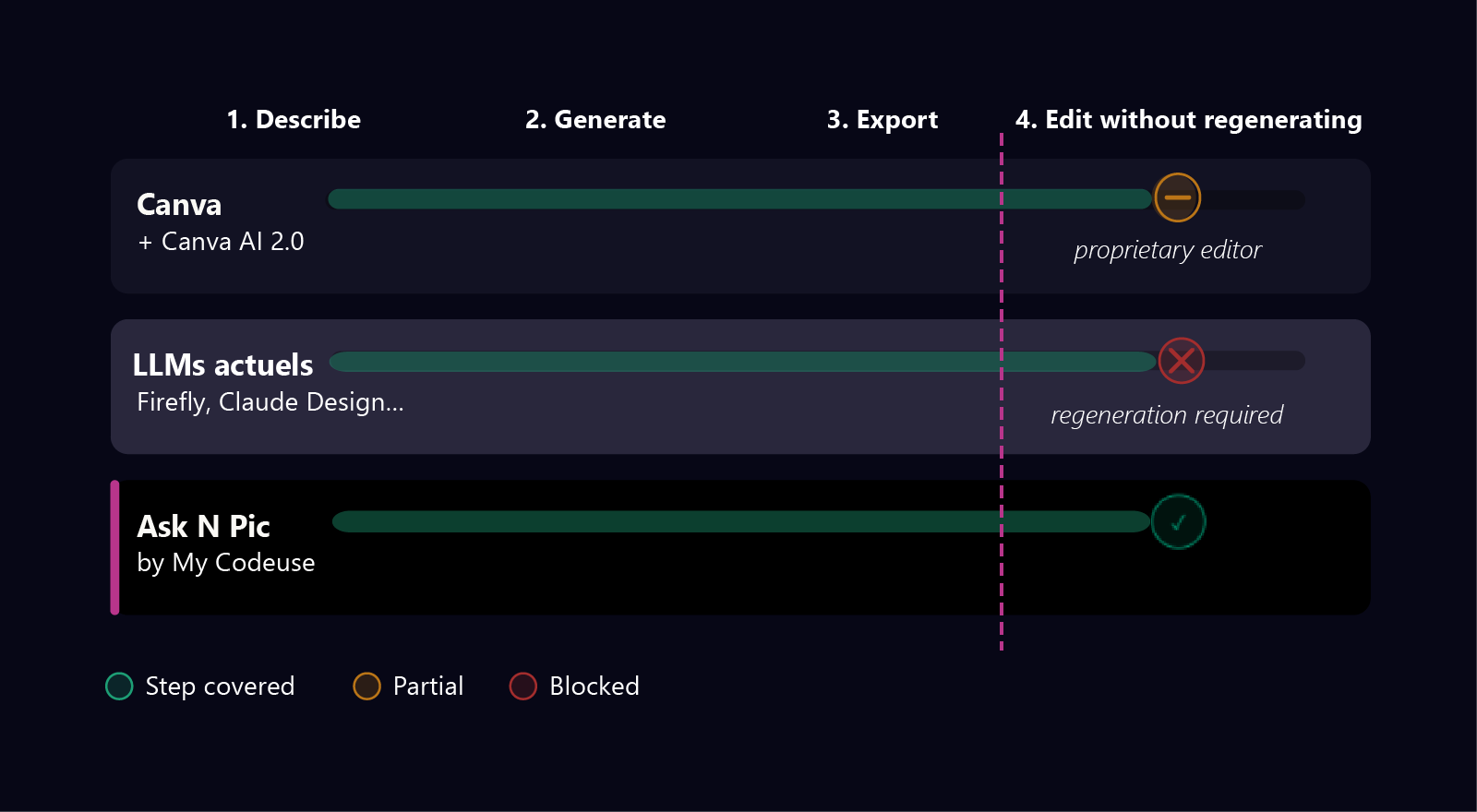
Recraft generates editable files in Illustrator or Figma from a prompt. This is a notable step forward for illustrations and icons. The main limitation: no real-time editing without regeneration. If you want to change a colour or a text, you need to regenerate the whole thing. Recraft Inc. is based in London with US funding: non-sovereign infrastructure.
Adobe Firefly
Adobe Firefly generates raster images that can be decomposed into layers within the Adobe ecosystem. Powerful for photographic visuals and retouching. On strict GDPR compliance: Adobe Inc. is a US company incorporated in Delaware, subject to the Cloud Act. GDPR compliance is only available with an enterprise DPA: inaccessible without a dedicated contract for freelancers and SMEs.
Claude Design (Anthropic Labs)
Launched in beta in June 2026, Claude Design generates presentations and visual documents from a conversational prompt, with iteration in natural language. Strengths: integration within the Claude ecosystem, configurable organisational design system. Main limitation: no real-time editing without regeneration, exports are HTML, PDF or PPTX. On sovereignty: Anthropic PBC is a Delaware entity subject to the Cloud Act, the AI training opt-out is not enabled by default7. Only available on Pro, Max, Team and Enterprise Claude plans.
Gamma (Gamma Tech, Inc.)
Gamma generates presentations, documents and websites from prompts. It uses multiple LLMs in parallel: Claude (Anthropic), ChatGPT + DALL-E (OpenAI), Gemini + Imagen (Google). It is powerful for slides and documents, not for structured graphic compositions like business cards or brand guidelines. On compliance: Gamma is a US entity (San Francisco), with designated EU/UK representatives and a declared SOC 2 Type II. According to its Terms of Service (§4.5, effective September 2025)8, user content feeds AI training by default on Free, Plus, Pro and Ultra individual plans: automatic opt-out is only guaranteed on Team and Business plans.
Looka
Looka generates logos using AI (guided questionnaire: sector, style, colours, name) then offers a complete brand kit: marketing templates, business cards, email signatures. Low entry price: $20 one-time for a PNG logo, $96/year for the full brand kit. Rights are retained after cancellation. Main limitation for European users: Looka Inc. is a Canadian entity (Toronto, Ontario law), no EEA representative designated, no CCT/DPA mechanism mentioned in the privacy policy (captured 02/06/2026)9. Terms of Service date from 2019: a weak maintenance signal. No real-time editing without regeneration.
Microsoft Designer
Microsoft Designer is integrated into Microsoft 365 (Personal at $9.99/month, Family at $12.99/month) or accessible for free with limited credits. It generates visuals from prompts, with AI-assisted editing. Critical limitation: the Terms of Service (Designer Supplement, art. 1)10 explicitly state that Microsoft Designer is reserved for personal use only and is not authorised for commercial activity. Professional use is therefore not covered contractually. Microsoft grants users a licence on outputs but disclaims any guarantee of non-infringement of third-party rights. Azure infrastructure (US Cloud Act).
Which tool for which use case in 2026?
Here is a factual summary by the most common use cases.
Quick social media visuals (posts, stories, carousels): Canva remains the most suitable, mature ecosystem, extensive templates, Canva AI 2.02 for prompt-based generation. For teams, Canva Teams at $10/user/month3 (minimum 3 users).
Presentations and slides: Canva Pro or Pitch. For technically demanding presentations, PowerPoint or Google Slides often remain more reliable for compatibility.
Editable vector illustrations and icons: Recraft v4 or Figma (with training). Adobe Illustrator for vector professionals.
Data infographics: Piktochart or Visme. For communication infographics (steps, processes, tips), description-based generation is faster.
Visual identity and custom compositions (business cards, brand guidelines, banners): Looka generates a logo and complete brand kit from a guided questionnaire, it is fast and affordable ($20 one-time for a logo), but the result is a static file that cannot be edited element by element, and Looka has no GDPR representative in Europe. Adobe Express covers business card and banner templates, but remains constrained by template logic and US infrastructure.
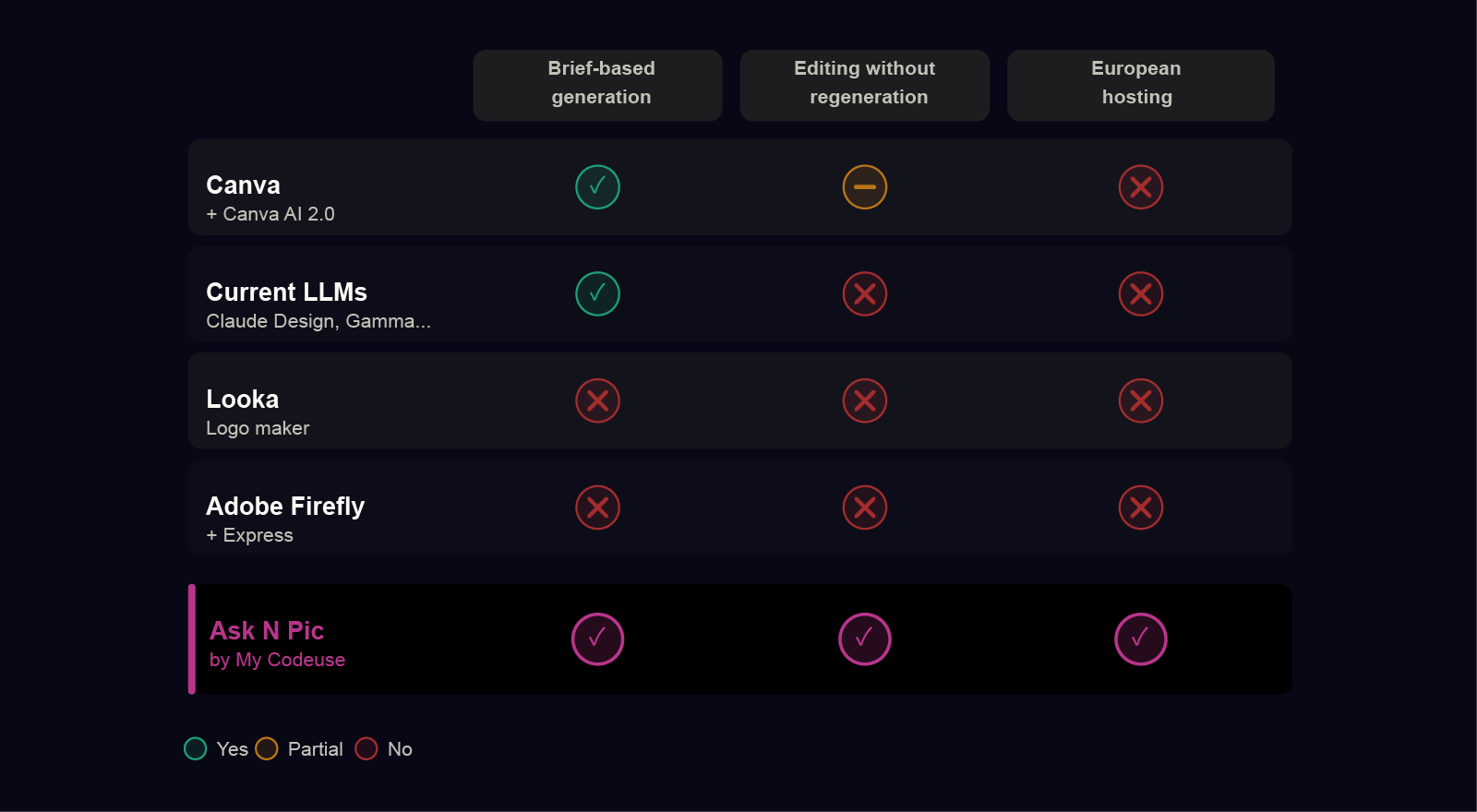
The structural problem is the same regardless of the category: modifying a detail after generation requires either starting over from scratch, or opening a specialist editor. None of the tools listed above resolves both at once, generating from a brief and making the result editable directly in the browser, without US infrastructure.
That is precisely what Ask N Pic is built to cover, with a self-hosted open source AI model on Infomaniak infrastructure (Switzerland, outside Cloud Act jurisdiction).
Data sovereignty and AI training comparison
The table below summarises information from the privacy policies and Terms of Service of each tool, captured in June 2026. Each point can be verified on the publisher's website, but information may evolve.
| Tool | Your data hosting | Cloud Act | GDPR | AI training on your data |
|---|---|---|---|---|
| Canva | ❌ AWS (USA) | ⚠️ AWS + OpenAI | ✅ IE entity for EU | ✅ Opt-out available |
| Adobe Firefly | ❌ USA + India | ⚠️ Adobe Inc. Delaware | ✅ Enterprise DPA | ✅ Prohibited by contract |
| Figma | ❌ USA | ⚠️ Figma Inc. Delaware | ✅ DPA published | ✅ Opt-out available |
| Recraft | ❌ Not disclosed | ⚠️ US entity | ❌ No published legal basis | ❌ Not disclosed |
| Claude Design | ❌ Presumed non-EU | ⚠️ Anthropic PBC Delaware | ✅ IE entity for EU | ✅ Opt-out available |
| Microsoft Designer | ❌ Azure (USA) | ⚠️ Microsoft Corp. USA | ✅ IE entity for EEA | ✅ Opt-out available |
| Looka | ❌ Not disclosed | ⚠️ Canadian entity | ❌ No EEA representative | ❌ Not disclosed |
| Gamma | ❌ Presumed USA | ⚠️ Gamma Tech Inc. USA | ✅ EU/UK representatives designated | ⚠️ Depends on your plan |
| Ask N Pic | ✅ Infomaniak (Switzerland) | ✅ Outside jurisdiction | ✅ Native | ✅ Opt-out available |
⚠️ (Cloud Act) = tool subject to US legislation, which allows US authorities to access your data on request. Sources: legal pages of each tool, June 2026.
What this evolution means concretely
In June 2026, the visual creation tool market has evolved faster than expected. Canva AI 2.02 is a real step forward: prompt-based generation with editable layers is now in the tool everyone already uses. For most common needs, that is sufficient.
The cases where looking for an alternative are precise:
- You want to modify a detail of an AI-generated visual (change a colour, a text, hide a detail) without starting over from scratch. No current LLM allows this structurally: the model reinterprets at every call.
- You produce multiple visuals for the same brand and want them to be consistent without having to re-describe your brand guidelines every time. Most tools do not remember your preferences from one generation to the next.
- You handle sensitive client data and cannot afford to have your briefs transit through a US actor subject to the Cloud Act, regardless of its stated privacy policy.
Ask N Pic was designed to address precisely these three cases. Every element of a generated visual is editable in real time in the browser, without regeneration. Your briefs never leave our European infrastructure and are encrypted with a unique key per user: a stolen database alone is unusable. And with each validated generation, the model learns your style: your next compositions will be closer to your visual identity, without having to re-describe it. You can disable this option at any time from your settings.
Frequently asked questions
Canva alternatives: what you ask
Does Canva AI 2.0 really replace templates?
Canva AI 2.0, launched in April 2026, generates fully editable, layered designs from a natural language prompt, without choosing a starting template. This is a real evolution from Canva's historical approach. The generated composition stays within the Canva ecosystem (proprietary editor, AWS infrastructure). Source: Canva Create 20262.
Is Canva GDPR compliant?
Canva claims to comply with GDPR and has a privacy policy for European users. According to its official technical documentation4, data is hosted on Amazon Web Services (AWS). AWS is a US company subject to the Cloud Act, meaning that even EU-region storage does not protect against a request for access by US authorities. For organisations subject to strict sovereignty obligations, this is a documented residual risk.
Can I export SVG files with Canva?
Yes, SVG export is available on Canva Pro ($15/month), Canva Teams, Canva Education, and Canva for Nonprofits plans.11.
What Canva alternative for freelancers with GDPR constraints?
For freelancers who handle client data and want hosting outside the US Cloud Act, the major tools (Canva, Adobe Express, Figma) are hosted on US infrastructure. Ask N Pic is hosted exclusively on Infomaniak (Switzerland), a jurisdiction outside the Cloud Act, with a self-hosted open source AI model: no brief ever transits through OpenAI, Anthropic or Google.
What is the difference between Canva AI 2.0 and tools like Ask N Pic?
Canva AI 2.0 generates layer-editable designs in its own editor, on AWS infrastructure. Editing takes place within the Canva ecosystem. Ask N Pic generates editable graphic compositions where each element (text, colour, font, image) can be modified individually in the browser via an automatic form, without a graphic editor. Data stays on sovereign European infrastructure. Both approaches start from a natural language brief; what differs is the structure of the output and the location of the data.
Looking for an alternative for your professional visuals?
Ask N Pic generates business cards, LinkedIn carousels, infographics and brand guidelines from a description. Real-time customization. PNG, JPEG or SVG export. Hosted in Europe.
Join the beta